Your phone rings while you're on a ladder, elbow-deep in a breaker panel, or driving between jobs, and by the time you call back, the customer has booked someone else. That gap is exactly what automated call answering trade business owners are now closing, with an AI that picks up on the first ring, asks the questions you would ask, and puts the job on your calendar. You keep working, and the caller gets a real answer instead of a beep.
Call answering for tradesmen used to mean a voicemail greeting, a spouse covering the phone, or an outside service reading from a script. Each of those either loses the caller or leaves you a stack of callbacks to return at 9 PM. The newer option is software that holds a conversation, sorts a burst pipe from a quote request, and books or transfers the call based on rules you set.
What Is Automated Call Answering for Trades?
Automated call answering for trades is software, usually an AI voice agent, that answers your business line, talks with callers in plain language, collects job details, and books, routes, or escalates each call without a person picking up. It sits between your phone number and your schedule. Callers describe the problem in their own words, and the system decides what happens next based on your instructions.
It is different from the older tools that share the name. A phone tree (also called an IVR, short for interactive voice response) only routes callers by keypress, and voicemail only records a message. An AI receptionist, sometimes called a virtual receptionist, understands a sentence like "water is coming through my kitchen ceiling" and treats it as urgent.
The test that separates real automation from a dressed-up voicemail is simple. At the end of a typical call, is the job booked or the on-call tech alerted, or is there just a message waiting for you? Any automated call answering trade business owners consider should pass that test on one of their own real call types, live, before they sign anything.
Why Do Trade Businesses Miss So Many Calls?
Trade businesses miss calls because the people who answer the phone are usually the same people doing the work, and that work happens on roofs, in crawl spaces, under sinks, and behind the wheel. Calls also cluster at the worst moments, like the first hot week of summer, the first hard freeze, and evenings when homeowners get home and notice the leak. A two-person shop simply can't stop a water heater install every time the phone buzzes.
Field service phone answering has an extra wrinkle, which is dispatch. Even when someone in the office picks up, they often can't see which tech is closest or whether the current job will run long, so the caller hears "someone will call you back." That delay is where jobs leak, especially when the caller is working down a list of three companies.
What the Benchmarks Show
The size of the gap depends on how you measure it. In Invoca's July 2026 home services benchmark, only 52% of inbound calls to home services businesses were answered by a person, and answer rates ranged from 32% to 74% across the nine sub-industries in the study. PPC Land's coverage of the same report put HVAC near the bottom of that range at 34%, below the home services average by a wide margin.
CallRail's January 2025 small business report found a much lower 14% missed-call rate for home services, and it also found that up to 85% of customers whose calls go unanswered won't call back. The two reports measure different things with different data, so treat them as a range rather than a verdict. The figure that matters for your shop is your own, and you can pull it from last month's call log in about ten minutes.
Why Speed Decides Who Gets the Job
Speed matters for reasons that go beyond good manners. Harvard Business Review's 2011 study "The Short Life of Online Sales Leads" found that firms contacting online leads within an hour were nearly seven times as likely to qualify them as firms that waited even one more hour. That research covered web leads rather than phone calls, but the lesson carries over, because the first business to give a real answer is usually the one that gets the visit.
How Automated Call Answering Works Behind the Scenes
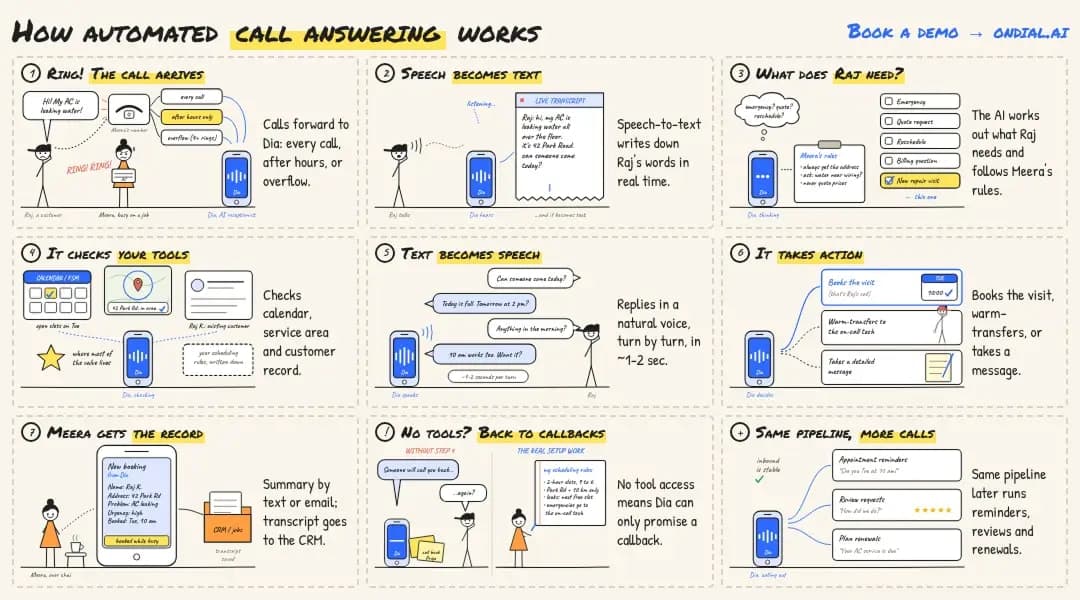
Automated call answering works by sending your calls to an AI voice agent that turns speech into text, works out what the caller needs, checks your business tools, and replies in a natural voice, usually within a second or two per turn in most implementations. Each piece is standard technology, and the value comes from how the pieces connect to your business. The same seven steps run on every call, in this order.
The call arrives. Your existing number forwards calls to the system, either every call, after-hours calls only, or overflow calls nobody picks up within a few rings.
Speech becomes text. A speech-to-text engine transcribes the caller's words in real time.
The AI works out intent. A language model reads the transcript, decides whether this is an emergency, a quote request, a reschedule, or a billing question, and follows the instructions you wrote about what to ask and what it may say.
It checks your tools. Through integrations, it looks up open slots in your calendar or field service management (FSM) software, confirms the address is inside your service area, and checks for an existing customer record.
Text becomes speech. The reply is spoken back in a natural-sounding voice, and the conversation continues turn by turn.
It takes action. The agent books the visit, warm-transfers the call to the on-call tech, or takes a detailed message when neither fits.
You get the record. A text or email summary arrives with the caller's name, address, problem, urgency, and booking time, and the transcript lands in your CRM or job system.
Step 4 is where most of the value lives. Without calendar and job-system access, even a natural-sounding agent can only promise a callback, which puts you right back where you started. Most automated call answering trade business setups spend the bulk of their configuration time here, because your scheduling rules have to be written down before software can follow them.
The same pipeline can run far more than inbound job calls. Many shops later point it at appointment reminders, review requests, or maintenance-plan renewals once the inbound side is stable. If you want to see how the technology stretches across other call types, browse these AI voice agent use cases.
What Does the AI Do on a Real Job Call?
On a typical job call, the AI greets the caller, identifies the problem, asks your qualifying questions, and ends with a booked visit, a transfer, or a clear next step. Picture a Tuesday at 6:40 PM. A homeowner calls a plumbing company because the water heater is leaking onto the garage floor, while the owner is finishing a repipe across town.
Using the script the owner approved, the agent asks whether water is still flowing, points the caller to the cold-water shutoff on top of the heater, and confirms the address is in the service area. It offers the first slot tomorrow at 8 AM or a paid after-hours visit tonight, and the caller picks tonight. The on-call tech gets a text with the address and a one-line summary, and the job is on the schedule before the owner packs up.
Qualifying the Job
Qualifying means deciding whether a call is a job you want before anyone drives out. Typical questions cover the ZIP code, the type of problem, the age of the equipment, whether the caller owns or rents, and how soon they need help. Good setups also screen out wrong-trade calls and sales pitches so they never reach your phone.
Asking for the booking matters as much as asking the questions. Invoca's 2026 home services benchmark reported that 55% of businesses don't ask leads to buy or book the job on the call. An AI agent configured to offer two specific time slots on every qualified call applies that rule consistently, including on the last call of a long day.
Booking the Visit
Booking is the step that turns a conversation into revenue. The agent offers real open slots, confirms the time out loud, and texts the caller a confirmation, which also helps with no-shows from people who forget what they agreed to. Which slots it may offer depends entirely on the calendar rules you give it.
How Should Emergency and Routine Calls Be Routed?
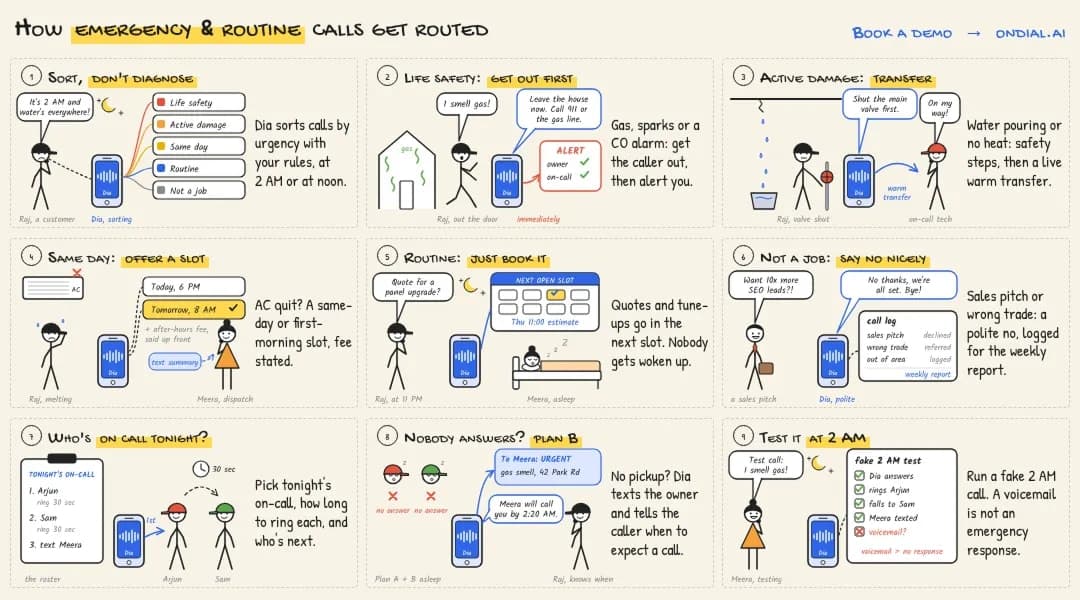
Emergency calls should reach a person within minutes through a live transfer or on-call alert, while routine calls should be booked into the next suitable slot without waking anyone up. The AI's job here is triage, which means sorting calls by urgency rather than diagnosing anything. You define the categories and the trigger phrases, and the system applies them the same way at 2 AM as it does at noon. Here is a starting framework most trade shops can adapt.
Urgency level | Example caller words | What the AI should do | Who gets notified |
Life safety | "I smell gas," "sparks from the panel," "CO alarm going off" | Tell the caller to leave the building and call 911 or the gas utility's emergency line, then alert you | Owner and on-call tech, immediately |
Active damage | "Water pouring through the ceiling," "no heat and it's freezing" | Give your approved safety steps (shutoff valve, breaker), then warm-transfer | On-call tech by live transfer |
Same day | "AC quit," "toilet won't stop running" | Offer same-day or first-morning slots and state any after-hours fee | Dispatcher or owner by text summary |
Routine | "Quote for a panel upgrade," "annual tune-up" | Book the next suitable slot or an estimate visit | Daily summary |
Not a job | Wrong trade, sales pitch, outside service area | Decline politely or refer, then log the call | Weekly report |
Setting Your On-Call Rules
An emergency rule is only as good as the person on the other end of it. Decide who is on call each night, how long the system should ring them before trying the next person, and what happens if nobody answers, such as texting the owner and telling the caller exactly when to expect a callback. Test the full chain with a fake 2 AM call before you rely on it, because a transfer that lands in a tech's voicemail is not an emergency response.
How Does Automated Answering Connect to Your Calendar?
Automated answering connects to your calendar through a two-way integration that lets the AI read open time and write confirmed bookings, so every job it books appears on the schedule your team already uses. Reading availability is the easy half, and writing the booking back is what makes the call finished. If an integration only reads, someone in your office still has to re-enter every job by hand.
Many providers connect to common calendars, and many also link to FSM or CRM tools directly or through an automation layer. Check your specific software by name rather than trusting a wall of logos on a sales page. Ask whether the connection is native or runs through a third-party connector, since each extra hop is one more thing that can break. A blank hour on the calendar isn't always a bookable hour, so write these rules down before you connect anything.
Job length by type, since a faucet swap and a water heater replacement need very different blocks
Drive-time buffers between appointments and travel limits per tech
Service area by ZIP code or radius
Which techs are licensed or experienced for which jobs
Same-day cutoff times and after-hours fees
Days or time blocks that are never bookable
Keep the calendar honest, too. If techs don't mark jobs that run long, the AI will keep offering slots that don't exist, and the customer will blame your business rather than the software. A two-minute end-of-day calendar check is the cheapest fix available.
Plumber, Electrician Call Answering, and HVAC: What Changes by Trade
The answering flow stays the same across trades, but the questions, urgency triggers, and seasonal pressure change, so each trade needs its own intake script. A plumbing caller and an electrical caller can describe equally urgent problems in completely different words. The script has to recognize both.
Trade | Common call reasons | Questions worth asking | When volume spikes |
Plumbing | Leaks, clogs, water heaters, sewer backups | Is water still running? Do you know where the shutoff is? Gas or electric heater? | Hard freezes, holidays |
Electrical | Outages, tripping breakers, panel upgrades, EV chargers | Is anything sparking or hot to the touch? Whole house or one circuit? | Storms, renovation season |
HVAC | No cooling, no heat, tune-ups, replacements | How old is the system? Is the thermostat on? Any burning smell? | First heat wave, first cold snap |
Other field service | Pest control, garage doors, appliance repair, locksmiths | What's the access situation? Any pets on site? Preferred time window? | Varies by season and region |
Mixed shops can run one line with branching scripts. The agent asks which service the caller needs first, then switches to that trade's questions and that trade's techs. Keep emergency triggers shared across every branch, since a gas smell matters whether the caller wanted a plumber or an HVAC tech.
How Does AI Answering Compare to Voicemail and Live Services?
AI answering resolves more calls on the spot than voicemail and usually costs less per call than a live answering service, but a trained human still handles upset or unusual callers better. The right choice depends on your call mix more than on any single feature. This table shows where each option tends to land.
Factor | Voicemail | Live answering service | AI call answering |
Picks up 24/7 | Yes, but only records | Depends on the plan | Yes |
Books jobs during the call | No | Sometimes, with calendar access | Yes, with an integration |
Handles several calls at once | Not applicable | Limited by staff on shift | Yes, in most systems |
Emergency escalation | No | Yes, with human judgment | Yes, based on your rules |
Upset or complex callers | No | Strong | Weaker, should hand off |
Typical pricing | Included with phone plan | Per-minute or per-call bundles | Monthly plan, per minute, or per call |
Follow-up work left for you | Every message | Many messages | Mostly exceptions |
A traditional contractor answering service still makes sense for some shops. If most of your calls involve insurance claims, angry customers, or high-ticket remodel consultations, a person's judgment on every call may justify the higher cost. Some businesses blend both, with AI covering routine and after-hours calls and people taking the rest.
Comparing these models gets easier when you line up features against your own call volume. Integrations and billing structure usually matter more than how the demo voice sounds. For a wider look at the options across small businesses, see this guide to the Best call answering system for SMBs.
What Automated Call Answering Trade Business Owners Should Expect to Pay
Most AI answering plans are priced per minute, per call, or as a flat monthly fee with an included bundle, and the true cost depends on your call volume and which features each tier includes. Watch three things when comparing quotes. First, check whether booking, live transfers, and integrations are included or locked behind a higher tier. Second, ask how overages are billed in your busiest month, and third, find out whether setup and script tuning are done for you or left to you.
For context on the human alternative, the U.S. Bureau of Labor Statistics puts the median receptionist wage at $18.27 an hour, or $38,010 a year, as of May 2025. That covers one shift before benefits, and it doesn't cover nights, weekends, or the hour your receptionist spends at lunch. Plenty of shops still want a person in the office, and AI answering works well as that person's overflow and after-hours backup.
How Do You Calculate ROI for Your Trade Business?
To estimate ROI, multiply the calls you miss each month by the share that are real leads, the share of leads you'd book, and your average ticket, then compare that recovered revenue with the monthly cost of the service. The example below labels every assumption, so you can swap in your own numbers. The lead and booking rates come from Invoca's 2026 home services benchmark, which found that 38% of calls answered by a person were leads and 45% of those leads converted on the call.
Input | Example value | Where it comes from |
Inbound calls per month | 200 | Assumption for a small shop |
Calls missed | 20%, or 40 calls | Assumption, between the published benchmarks |
Missed calls that are leads | 38%, or about 15 | Invoca 2026 benchmark |
Leads that book | 45%, or about 7 jobs | Invoca 2026 benchmark |
Average ticket | $450 | Assumption |
Recovered revenue | About $3,150 per month | 7 jobs multiplied by $450 |
Even at half those numbers, many shops break even on one or two booked jobs a month, depending on the plan they choose. The bigger risk is assuming every recovered call is new money, when some of those callers would have tried you again anyway. Run the math conservatively on last month's real call log, then recheck it after 30 days live.
Not every shop needs this. If you get a handful of calls a week and someone reliable is always near the phone, a well-worded voicemail and fast callbacks may be all you need. The math tips toward automation when calls are frequent, urgent, and arriving while everyone is out on jobs.
Limitations: What Automated Call Answering Can't Do Well
Automated call answering can't diagnose problems, quote firm prices on unseen work, or replace human judgment on emotional or unusual calls, and its accuracy depends on the information and rules you give it. Knowing these limits upfront helps you design around them. Here is where most systems fall short.
It can't see the job. The agent works only from what the caller says, so it shouldn't promise a fix or a firm price on work nobody has inspected, and price ranges or diagnostic fees are safer.
Noisy lines can trip it up. Speech recognition has improved a lot, but a caller on a windy roadside or a weak cell signal may have to repeat themselves, depending on the provider.
Upset customers want a person. Billing disputes, warranty arguments, and complaints should go straight to a human with the call summary attached.
It only knows what you tell it. Outdated prices, hours, or service areas produce confident wrong answers, and customers will hold your business responsible for them.
Integrations vary widely. Some systems book directly into FSM software, while others only read a calendar or pass data through a third-party connector.
Setup takes real effort. Writing intake questions, emergency rules, and calendar rules takes a few hours of your time, and the first weeks need regular transcript reviews.
None of these are reasons for automated call answering trade business owners to skip the technology. They are reasons to keep a clear path to a human and to read your transcripts, especially in the first month. Shops that treat setup as a one-time task tend to get the weakest results.
What Legal Basics Should You Check Before Going Live?
Before going live, check call recording consent rules in the places you serve, tell callers they're speaking with an AI, and confirm that any outbound follow-up calls have proper consent. Recording rules vary by location, and in the U.S., most states follow one-party consent while some, including California, Florida, and Pennsylvania, require every party to agree. Kilpatrick Townsend's 2024 review of U.S. wiretap laws notes that the stricter standard generally applies when callers are in different states, so a short recording notice at the start of each call is the simple default.
Outbound calls carry separate rules. On February 8, 2024, the Federal Communications Commission ruled that AI-generated voices count as "artificial" under the Telephone Consumer Protection Act, which means calls using them generally require the recipient's prior express consent. That matters if you plan to use the same system for reminders or follow-ups, and since this is general information rather than legal advice, check with a lawyer for your state or country.
Being upfront also builds trust with callers. A greeting such as "You've reached Rivera Plumbing's virtual assistant, and I can book a visit or connect you with our on-call tech" sets expectations in one breath. Make sure any caller who asks for a person can reach one.
How Do You Get Started in One Week?
The lowest-risk rollout starts with after-hours and overflow calls, then adds your intake rules, emergency routing, calendar connection, and a round of test calls before you widen coverage. This sequence keeps daytime calls untouched while you learn how the agent behaves. A typical first week looks like this.
Pull last month's call log and count missed calls by time of day.
List your top five call reasons and the questions you ask for each one.
Write your emergency triggers and your on-call order.
Connect your calendar or FSM software and set your slot rules.
Forward after-hours and unanswered calls only, leaving daytime calls as they are.
Run ten test calls, including a fake emergency and a deliberately confused caller.
Read transcripts weekly for the first month and fix whatever trips the agent up.
Once after-hours calls run cleanly, widen coverage to daytime overflow. An automated call answering trade business rollout usually earns trust one call type at a time. Rushing every call type live on day one is an easy way to sour a team on the tool.
Ready to Stop Losing Jobs to Voicemail?
The simplest way to stop losing jobs to voicemail is to put an AI agent on your after-hours and overflow calls first, with emergency rules and calendar access in place from day one. Measure booked jobs against last month's missed calls, and expand coverage once the numbers hold up. The tool doesn't need to be perfect on every call to pay off, because its real job is catching the calls that would have gone to a competitor.
Look for a partner that configures intake questions, routing rules, and integrations around how your shop already runs, instead of handing you a blank settings screen. OnDial builds AI voice agents that answer, qualify, and book calls for service businesses. Explore the industries and call types the team works with on the OnDial services page, then reach out with a few of your own call scenarios to see how they would be handled.