A plumber lying under a sink cannot pick up the phone. Neither can a dental receptionist checking in three patients at once, or a salon owner halfway through a color appointment. Every one of those rings is a customer deciding whether to wait for you or call the next business on the list.
An automated phone answering system for small business closes that gap by picking up every call and finishing the job a receptionist would have done. It answers questions, books appointments, qualifies new leads, and passes urgent calls to a person. This guide covers how these systems work from the first ring to your CRM, how to set one up, and what one really costs each month.
The short answer: An automated phone answering system for small business is software, usually an AI voice agent, that answers your business line every hour of the day. It understands what callers say, replies in a natural voice, and takes action such as booking an appointment or routing an urgent call. On usage pricing like OnDial's $0.055 per minute, a business handling 600 three-minute calls a month pays roughly $114 including a phone number and two call channels.
What Is an Automated Phone Answering System for Small Business?
An automated phone answering system is software that answers incoming calls without a person picking up. The label covers a wide range of tools, from a recorded menu that says "press 1 for sales" to an AI voice agent that holds a real conversation. For a small business, the version worth paying for is the second kind, because a caller with a real question rarely wants to sit through a menu.
Auto Attendant, IVR, and AI Voice Agent Are Three Different Things
An auto attendant plays a greeting and transfers the call based on a keypress. An IVR (interactive voice response) system adds some self service, such as checking an order status by typing in a number. Both run on a fixed script, so anything outside that script ends in voicemail or a transfer to someone who may not be free.
An AI voice agent listens to what the caller says in their own words and answers in kind. It can handle "Do you cover the north side, and can someone come out Thursday?" in a single turn, which no keypad menu can do. That is what most vendors now mean when they sell automated phone answering, and it is the type this guide focuses on.
Type | How callers interact | Books appointments | Handles unscripted questions | Usual cost basis |
Auto attendant | Keypad menu | No | No | Bundled with a phone plan |
IVR | Keypad or simple voice commands | Limited | No | Per line or per minute |
AI voice agent | Natural conversation | Yes, directly in your calendar | Yes, within its knowledge base | Per minute or monthly plan |
Live answering service | Human operator | Yes | Yes | Per call or per minute, at a higher rate |
What It Handles on a Normal Business Day
Most small businesses get the same handful of calls over and over. A well configured agent takes care of nearly all of them without anyone on your team touching the phone. Here is what that usually looks like in practice:
Answering common questions about hours, location, prices, service areas, parking, or accepted insurance
Booking, moving, and cancelling appointments directly in your calendar
Qualifying new leads with your own questions about job type, budget, and timeline
Taking detailed messages and sending you a summary by SMS or email
Routing urgent calls straight to the right person's mobile
Catching after hours calls and overflow calls when every line is busy
Your staff still handles the calls that need judgment or a personal touch. The agent takes the repetitive calls that eat into their day, plus anything that arrives when nobody is free. After a few weeks, the call logs show you exactly which calls belong in which bucket.
What Missed Calls Really Cost a Small Business
Most owners underestimate how many calls slip through, because a missed call leaves no trace beyond a line in the call log. Nobody complains, and nobody leaves a bad review. The customer simply calls someone else.
How Many Calls Go Unanswered
When 411 Locals placed test calls to 85 businesses across 58 industries, only 37.8% were answered by a live person. The rest rang out, went to voicemail, or landed in a menu. The sample is small, but it matches what many owners find when they finally pull a month of call logs.
Speed matters as much as pickup. A Harvard Business Review study on lead response, "The Short Life of Online Sales Leads," found that firms contacting a lead within an hour were nearly seven times as likely to qualify it as firms that waited even one hour longer. A phone call is the warmest lead a small business ever gets, and sending it to voicemail turns it cold.
A Five Minute Formula to Price Your Own Missed Calls
You do not need an industry average to know your own number. Pull last month's call log from your phone provider and count the calls nobody answered. Then run this formula:
Monthly revenue lost = missed calls × share that were new customers × your close rate × average first job value
Here is an illustrative example for a home services company. Say the log shows 40 missed calls in a month, about 30% of those were new prospects, you normally close 25% of prospects, and an average first job is worth $400. That works out to 40 × 0.30 × 0.25 × $400, or $1,200 a month in work that went to a competitor, which is $14,400 a year before you count any repeat business.
Put your own numbers in and keep the result handy for the cost section below. If recovering one or two jobs a month covers the bill for the system, the decision gets very simple. If it does not, you have learned that cheaply too.
How an AI Phone Answering System Works, From First Ring to CRM
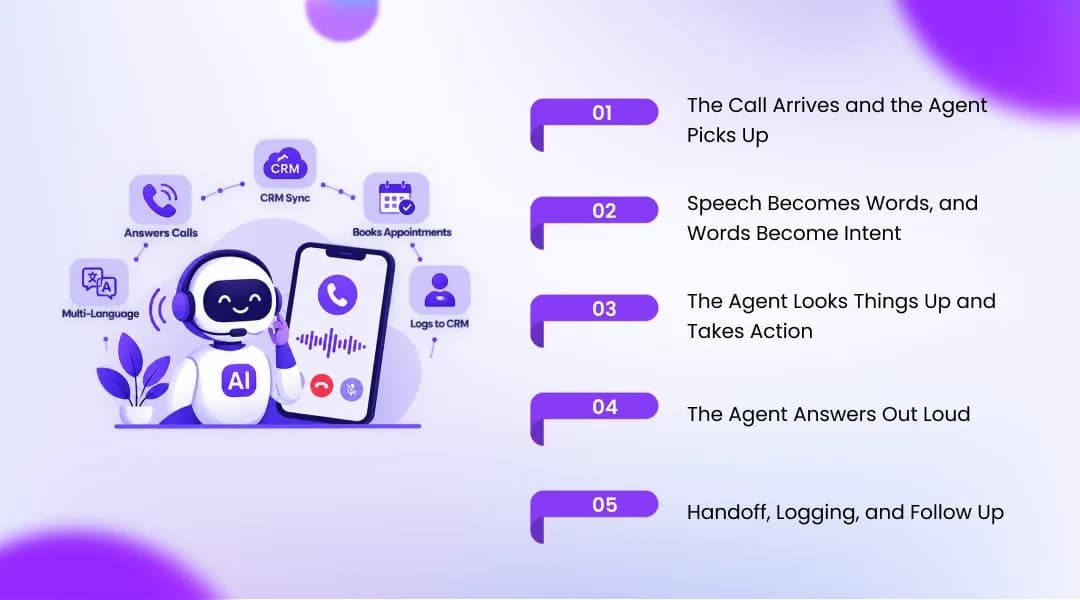
Every call runs through the same loop of listening, thinking, and speaking, repeated many times a minute. The quality of each step decides whether the caller feels heard or stuck. Here is the full path of a single call through the system.
Step 1: The Call Arrives and the Agent Picks Up
The caller dials your normal business number. Depending on your setup, the call either goes straight to the AI agent or rings your team first and forwards to the agent when nobody answers. The agent greets the caller by your business name and can say up front that it is a virtual assistant and that the call may be recorded, which some regions require by law.
Step 2: Speech Becomes Words, and Words Become Intent
Speech recognition turns the caller's voice into text while they are still talking. A language model then reads that text and works out what the caller actually wants, whether that is booking a cleaning, asking about price, or reporting a burst pipe. Good systems cope with accents, background noise, and callers who change their mind halfway through a sentence.
Step 3: The Agent Looks Things Up and Takes Action
Once it knows the intent, the agent checks its knowledge base for answers about hours, pricing, or policies. If the caller wants an appointment, it reads your live calendar, offers open slots, and writes the booking back. If the caller is a new lead, it asks your qualifying questions and saves the answers to your CRM or a spreadsheet.
Step 4: The Agent Answers Out Loud
Text to speech turns the reply into a natural sounding voice. The gap between the caller finishing a sentence and the agent starting to reply is called latency, and it decides whether the call feels like a conversation or a walkie talkie exchange. OnDial lists its response latency at under 200 milliseconds, which keeps the back and forth close to a normal phone call.
Step 5: Handoff, Logging, and Follow Up
Some calls need a person, such as an upset customer, a complicated quote, or a genuine emergency. The agent transfers those to the right phone with a summary attached, so the caller does not have to repeat the story. After every call, the transcript, outcome, and next step land in your CRM, and the caller can receive an SMS confirmation.
A Sample Call, Line by Line
Most guides describe these steps in the abstract, so here is what they look like on an actual call. The business below is a fictional plumbing company using conditional forwarding. The whole exchange takes under two minutes.
Time | Caller | Agent | Behind the scenes |
0:00 | (Office phone rings out) | "Thanks for calling Brightside Plumbing, this is the virtual assistant. How can I help?" | Call forwarded on no answer |
0:08 | "My water heater is leaking. Can someone come today?" | "Sorry to hear that. Is water pooling on the floor, or is it a slow drip?" | Intent detected as urgent repair, triage question from your call flow |
0:20 | "A slow drip, but it's getting worse." | "Thanks. The earliest technician slot today is 3:30 pm. Shall I book it?" | Live calendar checked |
0:35 | "Yes, please." | "Great. Can I confirm your name, address, and mobile number?" | Slot held |
1:10 | (Gives details) | "You're booked for 3:30 today, and I've texted you a confirmation." | Job and new lead written to CRM, SMS sent |
1:25 | "Is there a call out fee?" | "Yes, it's $79, and it's credited against the repair if you go ahead." | Answer pulled from knowledge base |
Notice that the agent asked a triage question before booking. That single question, written into the call flow by the owner, is what separates a useful agent from a glorified voicemail. The next section shows how to write those flows.
How to Set Up a Small Business Phone Answering System
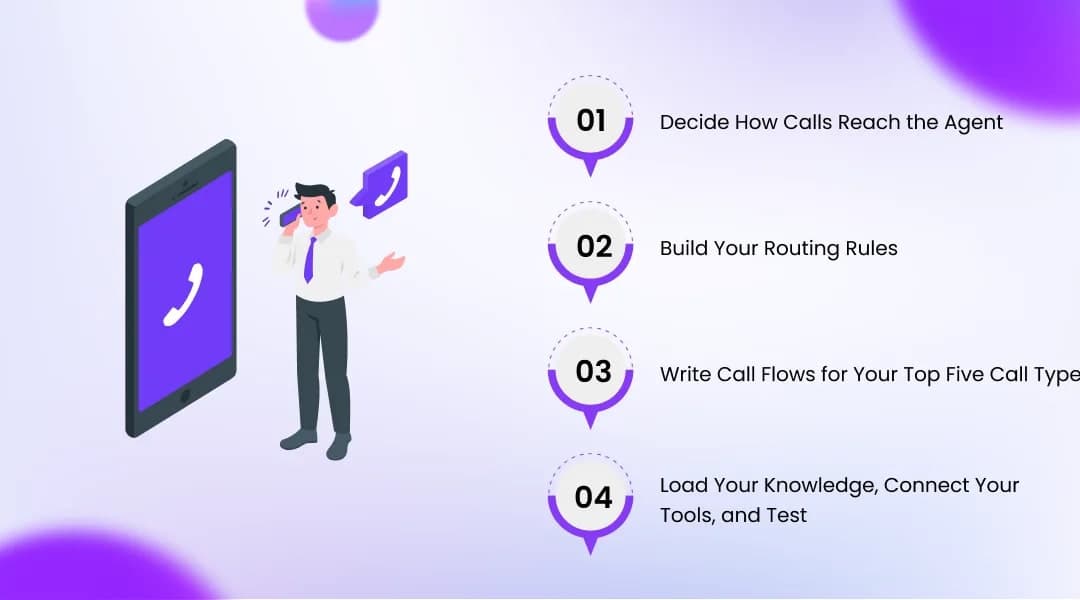
Setting up a small business phone answering system is less technical than most owners expect, and most of the work is deciding how you want calls handled. The phone side takes minutes, while the call flows deserve a few hours of thought. Work through these four stages in order.
Decide How Calls Reach the Agent
You have three options for connecting your phone line to the agent. Each one suits a different level of trust in the system. Most businesses move from the first or second option to the third over time:
A new number: The platform gives you a fresh number, which works well for a new location, a campaign, or a separate after hours line.
Conditional forwarding: You keep your current number and forward calls to the agent only when the line is busy, unanswered after a few rings, or outside business hours.
Number porting: You move your existing number onto the platform entirely, which makes sense once you trust the agent with every call.
We recommend starting with conditional forwarding. Your team keeps answering as usual, and the agent only catches what they miss. You get real call data within a week without changing anything your customers see.
Build Your Routing Rules
Routing rules decide who handles which call and when. Write them down as plain sentences before you configure anything, because the logic is easier to check on paper. A typical set for a small service business looks like this:
During business hours, ring the front desk for four rings, then send the call to the agent
After hours, send every call straight to the agent
If the caller reports an emergency, transfer to the on call technician's mobile
If the caller asks for a named staff member, take a message and text it to that person
If the caller is an existing customer with an open job, pull their record before answering
Write Call Flows for Your Top Five Call Types
Open your call log and list the five most common reasons people call you. For a dental clinic, that might be new bookings, rescheduling, insurance questions, emergencies, and billing. For each one, write down what the agent should ask, what it should do, and when it should hand off to a person.
Keep each flow short and specific. "Ask whether the pain is severe and whether there is swelling, then book the first emergency slot or transfer to the dentist on call" is a usable instruction. "Handle emergencies appropriately" gives the agent nothing to work with.
Load Your Knowledge, Connect Your Tools, and Test
Give the agent a plain document with your prices, services, service areas, policies, and the questions customers ask most. Connect your calendar and your CRM so bookings and leads land where your team already works. Then call the agent yourself at least 20 times with odd questions, bad lines, and interruptions, and fix every answer that sounds wrong.
Go live on after hours calls first. After a week of clean transcripts, extend the agent to overflow calls during the day. This staged rollout means any rough edges show up on low stakes calls.
What an Automated Phone Answering System Costs
Pricing for an automated phone answering system for small business varies more by pricing model than by vendor. Once you know which model you are looking at, comparing quotes gets much easier. Start with the four models below.
The Four Pricing Models You Will Run Into
Almost every product on the market uses one of these structures. Some combine two of them, such as a monthly fee with a per minute rate on top. Knowing which one you are looking at stops you comparing a per call quote against a per minute quote:
Per minute: You pay for the minutes the agent spends on calls, which suits businesses with uneven call volume.
Per call or per resolution: You pay a set fee for each call handled, which is predictable but expensive if calls are short.
Monthly bundle: A flat fee includes a set number of minutes or calls, with overage charges above that.
Live answering service: A human operator answers, usually priced per call or per receptionist minute at a much higher rate than AI usage.
Line Items That Hide Behind the Headline Rate
The advertised per minute rate is rarely the whole bill. Before you sign, ask every vendor for a full monthly estimate based on your actual call volume. Check these items in particular:
Phone numbers: Most platforms charge a monthly fee per number.
Concurrent channels: This sets how many calls the agent can take at the same moment, and one channel means a second caller waits or gets voicemail.
Model and voice fees: Some platforms bill speech, language model, and voice costs separately from the base rate.
Setup or onboarding fees: Some vendors charge to build your first call flows.
Minimum commitments and contracts: Check whether you are locked into a term or a minimum monthly spend.
SMS and transfer charges: Confirmation texts and call transfers sometimes carry their own fees.
Size your concurrent channels to your busiest hour of the week, not your average hour. A dental office that gets six calls in the ten minutes after opening needs more than one channel, even if it averages one call every twenty minutes. Running short on channels quietly recreates the missed call problem you were trying to solve.
Worked Example: 600 Calls a Month on OnDial
Here is a realistic monthly bill for a busy small business using OnDial's published Essential rate. The assumptions are 600 inbound calls a month at an average of three minutes each, one phone number, and two concurrent channels. Rates come from the OnDial pricing page at the time of writing.
Line item | Calculation | Monthly cost |
Call minutes | 600 calls × 3 minutes = 1,800 minutes × $0.055 | $99.00 |
Phone number | 1 × $4.90 | $4.90 |
Concurrent channels | 2 × $4.90 | $9.80 |
Total | $113.70 |
That works out to about 19 cents per answered call. The Essential tier covers up to 10,000 minutes a month, and the per minute rate drops to $0.050 and then $0.045 on the Growth and Scale tiers as volume climbs. Compare that monthly total with the missed call figure you worked out earlier.
AI Phone Answering Compared With a Human Receptionist
A fair comparison weighs AI against the staffing you can realistically afford, for the hours your customers actually call. Few small businesses can pay someone to sit by the phone at 9 pm on a Sunday. Here is how the two options stack up on cost, coverage, and the work each does best.
Cost and Coverage Side by Side
According to the US Bureau of Labor Statistics, the median pay for receptionists is $38,010 a year, or $18.27 an hour. A full time receptionist working 40 hours a week covers about 173 hours a month, which is roughly 24% of the 730 hours in an average month. Wages alone come to about $3,167 a month before payroll taxes, benefits, and paid leave.
Factor | Full time receptionist | AI answering system |
Monthly cost | About $3,167 in wages at the BLS median, before benefits | About $114 in the example above |
Hours covered | About 173 of 730 hours (24%) | All 730 hours |
Calls handled at once | One | As many as your concurrent channels |
Breaks, sick days, holidays | Yes | None |
Difficult or emotional conversations | Strong | Limited, so it hands off to a person |
Recognizing regulars by name | Strong | Possible with CRM data |
Languages | Usually one or two | OnDial lists support for more than 100 |
Where a Human Still Wins
A good receptionist reads tone, calms an angry customer, and remembers which regulars prefer morning slots. They also greet walk ins, sign for deliveries, and handle the paperwork that never touches a phone. An AI agent does none of the in person work and should hand off emotional or high stakes calls rather than try to win them.
The Hybrid Setup Most Owners Should Start With
For most small businesses, the strongest setup combines both. Your team answers during the hours they are free, and the agent catches overflow, lunch breaks, evenings, and weekends. That way the receptionist spends the day on customers in front of them, and your callers stop hearing a voicemail greeting.
Buyer Checklist for an Answering System for Small Business
Use this checklist on every demo call and every free trial. If a vendor cannot answer a question clearly, treat that as an answer. If you are still comparing named products, our ranking of the best call answering system for SMBs covers the leading options side by side.
Call Quality and Capability
Test these yourself instead of trusting the sales deck. Call the demo line from a noisy room and from a weak mobile signal. Then check the following:
Replies start quickly, with no long silence after you stop talking
The agent copes with your accent and your customers' accents
It handles interruptions and changes of mind mid sentence
It books directly into your calendar rather than just taking a message
It speaks the languages your customers use
Pricing, Contracts, and Hidden Fees
Ask for a written monthly estimate based on your real call volume. Make sure every line item from the list above appears on it. Then confirm these points:
The full per minute or per call rate, including model and voice costs
Fees for phone numbers, concurrent channels, SMS, and transfers
Any setup fee, minimum spend, or contract term
What happens to unused minutes or credits
Whether a free trial lets you test on real calls
Data, Compliance, and Human Handoff
Your call recordings contain customer names, addresses, and sometimes health or payment details. Ask how that data is stored, who can access it, and which security standards the vendor is audited against. Then check the handoff experience, since that is where callers judge you most:
Urgent calls transfer to a person with a summary attached
Transcripts and outcomes sync to your CRM automatically
The agent can disclose that it is a virtual assistant and that calls are recorded
The vendor supports the regulations your industry follows
How OnDial Answers Your Small Business Phone Line
OnDial is an AI voice agent platform that works as a small business phone answering system out of the box. It answers inbound calls, places outbound reminder and follow up calls, and works in more than 100 languages and over 50 regional accents. Every call ends with the intent, sentiment, summary, and outcome logged in your CRM.
What You Get From the First Day
Your agent answers in your business name, books into your calendar, qualifies leads with your own questions, and hands complex calls to your team with the full conversation attached. Pricing is usage based, starting at $0.055 per minute with $4.90 a month for each phone number or concurrent channel. You can see how the platform fits different trades and service businesses on the OnDial for small business page.
Start With After Hours, Then Expand
We suggest the same staged rollout described above. Point your after hours and no answer calls at the agent, review the transcripts for a week, and widen its job once you like what you hear. To see it handle calls from your own industry, Book a demo and we will set up a test agent on your real call flows.