Here is a number that should bother every sales leader. According to CRM org's 2026 data, 32% of sales reps spend more than an hour every single day typing notes into their CRM. That works out to over 250 hours a year, per rep, spent not selling.
AI voice agents update your CRM automatically so that hour goes back to work that moves revenue. When a call ends, the agent has already logged the summary, updated the contact, set the deal stage, and created the follow-up task, with nobody touching a keyboard. If you have been cautious about handing your system of record to software, that caution is fair, and this guide respects it. I have spent the last few years at OnDial building voice agents that write into live CRMs for Indian and global teams, and I will show you exactly how the automatic update works, what it can safely handle, where it breaks, and how to decide if it fits your operation.
What Does It Mean for an AI Voice Agent to Update Your CRM?
An AI voice agent CRM integration connects a conversational voice system directly to your customer database so every call reads from and writes to your records without manual input. The value is not the voice. It is what happens to the data after the caller hangs up.
The Manual-Entry Problem This Solves
Most call outcomes never reach the system of record on time. A rep finishes a conversation, then has to summarise it, update the account, log the outcome, and schedule a follow-up later, if they remember. Salesforce's 2026 State of Sales report found that reps spend roughly 60% of the workweek on non-selling tasks, including this exact CRM upkeep, which is close to 24 hours a week gone.
That delay is where deals leak. Leads sit uncontacted, records stay half-complete, and managers cannot see accurate pipeline data in real time. Automated CRM data entry removes the lag by turning the conversation itself into structured data the moment it happens.
A Plain Definition of Automatic CRM Updates
When an AI voice agent updates your CRM, it captures structured details from a spoken conversation and writes them into the correct CRM fields automatically, during or right after the call.
That is the whole idea in one sentence. No dashboard to check, no note to transcribe by hand. The agent behaves like a diligent rep who logs everything perfectly and never forgets, then hands your team a record that is already clean and current with Real Estate AI voice agents.
How Do AI Voice Agents Update Your CRM, Step by Step?
This is the question I get asked most, usually with a healthy dose of doubt. So here is the honest mechanical answer, not a marketing version.
AI voice agents update your CRM by transcribing the call with speech recognition, extracting the key details with language understanding, and then using function calling to write those details into your CRM through its API or a webhook. The write happens automatically, mapped to the fields you defined during setup.
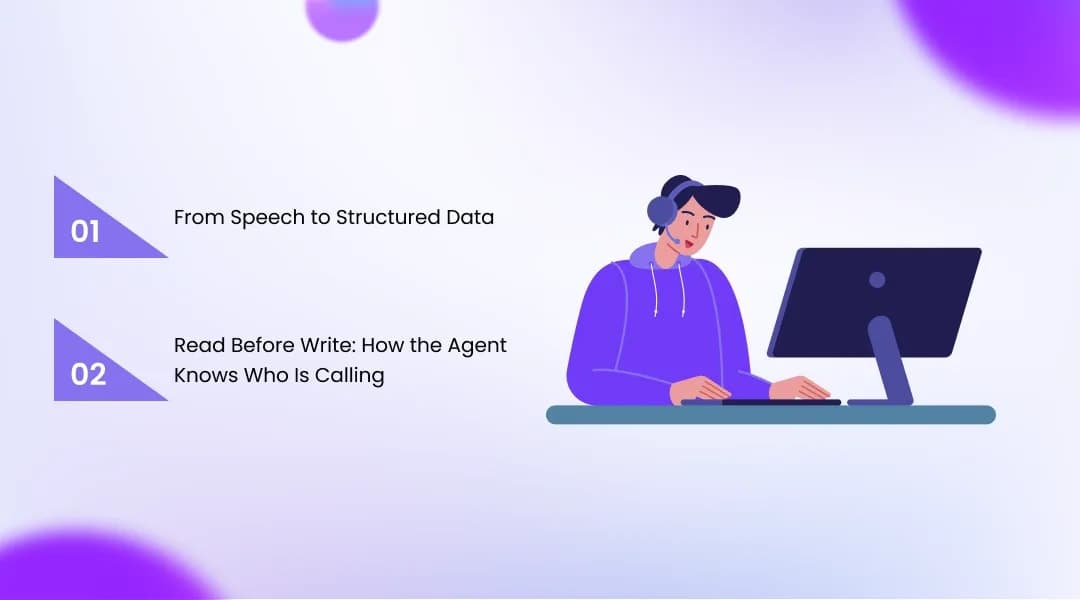
From Speech to Structured Data
The pipeline runs in a fixed order, and each stage feeds the next:
Speech-to-text: Automatic speech recognition (ASR) transcribes the live conversation as raw input for everything downstream.
Intent and entity extraction: Natural language understanding pulls out the parts that matter, such as budget, timeline, product interest, and the caller's stated next step.
Function calling: The agent triggers a defined function, for example, "update contact" or "create deal," with the extracted values as parameters.
The CRM writes: That function sends a request to your CRM's REST API or fires a webhook, and the record updates. A GET request pulls existing data; a POST or PATCH writes the new values.
The reason this matters is control. You decide during setup that "customer name" maps to the Contact Name field and "company" maps to Account Name, and the agent follows those mappings on every single call without drifting.
Read Before Write: How the Agent Knows Who Is Calling
Good integrations do not just write. They read first, so the conversation is personalised and the update lands on the right record. Before answering, the agent can look up the caller by phone number, email, or name and pull their history.
Here is the part teams underestimate. The agent has to decide whether this caller is an existing contact or a brand-new one, then either update the match or create a fresh record with the voice agent update. Most platforms handle this with duplicate-detection logic you configure, and authentication runs through OAuth tokens scoped to only the modules the agent is allowed to touch.
What Data Can an AI Voice Agent Write Back Automatically?
The short answer is more than you probably expect, and that is exactly why you want guardrails. A well-configured agent can populate almost every field a human rep would, drawn from one automatic CRM update per conversation.
Contacts, Leads, and Deal Stages
The agent creates or updates the core sales objects as the call unfolds. For a new caller, it opens a contact and attaches captured details like phone, email, and company.
For an existing lead, it can move the record forward based on what was actually said. A caller who confirms budget and timeline can shift from a marketing-qualified lead to a sales-qualified one, and a deal stage can advance automatically because the intent was detected, not because a rep remembered to click.
Call Summaries, Transcripts, and Follow-Up Tasks
Beyond the structured fields, the agent logs the narrative record of the interaction. This is the layer that gives managers visibility they never had from memory-based notes.
Call summary and transcript: The full transcript plus an AI-generated summary are attached to the contact or deal so anyone can see what happened.
Outcome and sentiment: The call outcome, disposition, and a sentiment signal get tagged for reporting and coaching.
Follow-up tasks: A qualified call can auto-create a task, a callback, or a calendar booking, and trigger a downstream workflow such as assigning the deal to a rep and sending a Slack alert.
I watched one real estate deployment do this end-to-end. Every buyer inquiry call logged a summary, updated the contact status, and created a follow-up task in the CRM without the agent ever opening it.
Real-Time Updates vs Post-Call Sync: Which Do You Actually Need?
Real-time updates are not always the goal. That sounds backwards, so let me explain, because choosing the wrong depth is a common and expensive mistake.
Real-time CRM updates write to your records during the live call, while post-call sync writes everything after the conversation ends with AI voice agents. Both are legitimate. The right choice depends on how fast you need to act on what was said.
The Three Levels of Integration Depth
Not every "CRM-compatible" voice agent means the same thing. Vendors sit on a spectrum, and knowing where yours falls tells you what you are really buying:
Shallow integration: Updates basic contact fields through the API after the call ends. Fine for simple logging, weak for pipeline movement.
Mid-tier integration: Logs the full transcript and summary and creates follow-up tasks automatically. This covers most SMB needs well.
Deep integration: Autonomously manages deals, enrols contacts in sequences, and triggers multi-step workflows in real time during the call. This is where voice AI stops logging and starts driving revenue.
The gap between these is not cosmetic. Native, real-time write-back can cut lead-to-CRM latency from minutes to under a second, which is the difference between calling a hot lead now and calling it after a competitor already did.
When Real-Time Beats Post-Call
Real-time earns its cost when the next action cannot wait. Inbound sales, appointment booking, and lead routing all benefit from a record that updates before the caller says goodbye, so the follow-up fires instantly.
Post-call sync is often enough for support logging, surveys, and quality review, where a summary written seconds after the call is perfectly fine. My honest advice is to match the depth to the workflow, not to buy the most aggressive option because it sounds impressive.
Which CRMs Work With AI Voice Agents?
Almost any CRM with a REST API can accept automatic updates from an AI voice agent. The real question is whether the integration is native or bridged through middleware, because that decides reliability and speed.
Salesforce and HubSpot Integration Patterns
Salesforce and HubSpot are the most deeply supported platforms in the market with CRM integrated AI voice agents. For HubSpot, many connectors are no-code and run in minutes, while Salesforce typically uses function-calling configuration once API credentials are ready, often live the same day.
Both support bi-directional sync, so context flows to the agent before the call and outcomes flow back after. Workflows in HubSpot can be triggered by AI call outcomes, for example, enrolling a qualified contact in a sequence, which is where the automation compounds.
Zoho and LeadSquared for Indian Businesses
For Indian teams, the stack usually looks different, and this is where OnDial spends a lot of its time. Zoho CRM is the most-used platform among Indian MSMEs and mid-market firms, especially in edtech, lending, and services, and it integrates through Zoho's REST API with OAuth scopes set per agent.
Zoho CRM: The agent acts as an authenticated client that creates leads, updates contacts, fetches account context, and can trigger Deluge workflows mid-call. Every interaction can also create a native Call record.
LeadSquared: Widely used by Indian BFSI and edtech teams for high-volume lead management, it accepts structured write-back through its API for lead capture and status updates.
Pipedrive and Microsoft Dynamics: Both are commonly served through native APIs or bridges like Zapier and Make when a native connector is not available.
The practical takeaway is simple. If your CRM has an API, an AI voice agent can update it, but native connectors will always beat middleware on latency and reliability.
What Can Go Wrong When AI Updates Your CRM?
Now the part most articles skip. Automating CRM updates is genuinely useful, and it also fails in predictable ways when it is set up carelessly. Being honest about this is how you avoid it.
The Failure Modes Teams Hit Most
I have seen the same problems recur across deployments, and almost none of them are the AI's fault:
Call state out of sync: When the live call and the database update drift apart, records get written to the wrong contact or not at all. This is the single most common technical break.
Duplicate contacts: Weak matching logic creates a second record for an existing caller, quietly splitting their history.
Reps stop trusting the system: If outcomes are not visible where reps work, they assume nothing happened, adoption drops, and the AI gets blamed for leads it already handled.
Silent write failures: Without retry logic on API errors, an update can fail, and no one notices until the pipeline looks wrong.
That third one is a people problem disguised as a tech problem, and it sinks more deployments than any bug.
How to Keep Your CRM Clean as You Scale
The uncomfortable truth is that the AI is only as good as the data foundation under it. Gartner projects that 40% of agentic AI CRM projects will fail or stall by 2028, and the cause is almost always data quality, not the technology itself.
Poor data is expensive on its own, with Gartner estimating it costs the average organisation around 12.9 million dollars a year in wasted spend and missed opportunity. The fix is unglamorous: define clear field mappings, configure duplicate detection deliberately, add retry logic for failed writes, and run a data-quality check on a sample of AI-created records before you expand with OnDial. Do that, and the automation stays an asset instead of quietly becoming a liability.
Conclusion
AI voice agents update your CRM by turning every conversation into clean, structured data the moment it happens, which is the difference between a pipeline you can trust and one you have to chase. Three things matter most: the agent reads before it writes, integration depth decides whether you get real-time action or simple logging, and your data foundation determines whether any of it holds up at scale. Handled well, you stop losing hundreds of hours a year to manual entry and start seeing your pipeline as it actually is.
You should feel confident evaluating this now, not overwhelmed by it. If you run on Zoho, LeadSquared, Salesforce, or HubSpot and want voice agents that write back accurately without breaking your records, that is exactly what we build at OnDial. Bring us your CRM stack and your messiest call workflow, and we will show you what a clean, automatic update looks like on your own data.